
Workflows
Design and build workflows using the visual Workflow Builder.
The Workflow Builder
The Workflow Builder is a visual editor for designing your workflows.
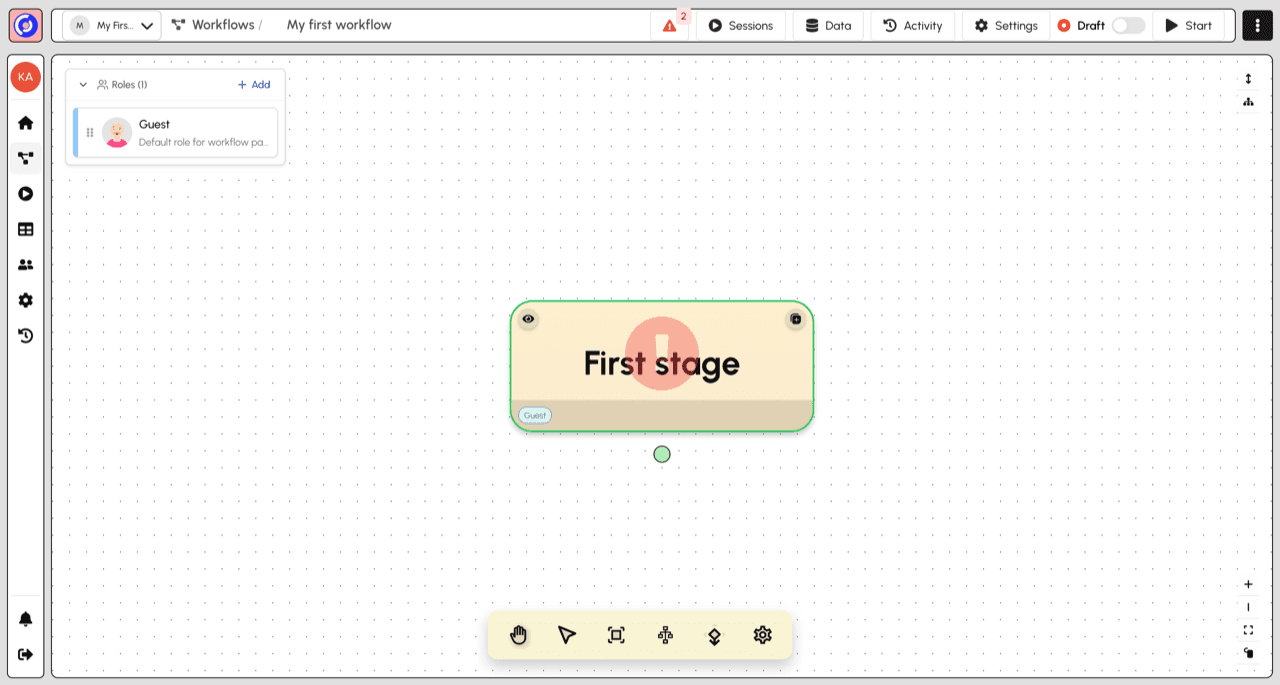
Key areas of the builder:
- Top toolbar - Switch between Builder and Operator views, toggle Draft/Published status, and start sessions
- Roles panel (left) - Manage the roles that participate in your workflow
- Stage canvas (center) - Visual graph showing stages and their connections
- Canvas controls (bottom) - Pan, select, re-center, auto-layout, and settings
New workflows start with a single "First stage" assigned to a default "Guest" role. From here you can:
- Click a stage to edit its content
- Add new stages and transitions
- Define roles and assign them to stages
- Configure stage settings and validation rules
Tip: Once your workflow is running, use the Operator view to monitor sessions and see where work is happening.